 Zap's Digital Lighthouse
About
Zap's Digital Lighthouse is
a Blosxom weblog for our digital outpost on the Internet
For info
info@rax.org
Useful links:
Google
Cyberpresse
The Reg
Slashdot
FreeBSD
LinkedIn
Twitter
Boursorama
RAX
zap
Soekris
xkcd
AirFrance
Wiki soekris
Wikipedia
Wiktionary
ACME
blosxom
Categories:
/FreeBSD (27)
/admin (4)
/blosxom (6)
/games (5)
/hardware (17)
/inet (4)
/misc (37)
/notwork (2)
/software (11)
/tech (1)
Archives:
2025 (1)
| January (1)
2024 (3)
| December (3)
2023 (1)
| June (1)
2021 (2)
| January (2)
2020 (2)
| December (1)
| September (1)
2019 (2)
| November (1)
| July (1)
2018 (6)
| December (1)
| November (3)
| January (2)
2017 (4)
| December (2)
| January (2)
2016 (3)
| November (1)
| October (1)
| January (1)
2015 (9)
| December (2)
| November (1)
| October (1)
| June (1)
| May (2)
| February (1)
| January (1)
2014 (9)
| December (1)
| October (1)
| September (1)
| August (3)
| May (2)
| April (1)
2013 (20)
| October (3)
| June (4)
| May (2)
| April (7)
| March (1)
| January (3)
2012 (60)
| December (4)
| October (1)
| July (5)
| June (7)
| May (1)
| April (6)
| March (3)
| February (14)
| January (19)
2011 (3)
| December (1)
| November (2)
2008 (1)
| October (1)

Thu, 02 Jan 2025
2025 is here, we're closer to 2050 than 2000

Well, we're now closer to 2050 than to 2000, as one of my favorite streamers on Twitch (who goes by the nickname Quickybaby) was pointing out earlier today in his stream.
I remember when the year 2000 was a distant point in time and we were all counting how old we'd be when that milestone would be reached. I computed that number would be 38 for me, and that seemed so far away! Now, I guess I have to compute when I'll have lived in the 21st century longer that I've lived in the 20th century (around year 2038 or so).
So much has changed since I was young: no one had a computer back then, and now, everyone has many of them -- in their phones, in their watches, in their TVs, in their cars. Cars are no longer necessarily equiped with combustion engines (we've been driving an Electric Vehicle since May 2024) and winters aren't as cold as they used to be... though my grandparents would probably have said the same, wouldn't they?
The big surprise in the past couple of years has been the quality of Generative AI. I've always been pretty good at seeing technological innovations coming, but I must admit that this one took me by surprise. It's gotten pretty good pretty fast, but it's still not really intelligence: I've asked one of the popular AI chatbots recently /"who scored the Montreal Canadiens two goals tonight"/ and it confidently answered with the names of two (likely) Canadiens players -- the only problem was that these two players scored goals in a recent Montreal Canadiens game, but not on the day I asked the question! It ignored, disregarded, or misinterpreted the "tonight" part of my question... rendering its answer completely useless. Oh well, still needs more work I guess.
So, back to 2025: it might be a year of big changes. Let's all stay on our toes and watch out for what will go on.
| Posted at 11:21 | permanent link
Tue, 31 Dec 2024
Playing Beat Saber on my Meta Quest 3

I am greatly enjoying my new Meta Quest 3 that I've blogged about a couple of days ago.
I've successfully linked it with the Steam library on my PC, allowing me to play impressive titles like Steam's own Alyx.
But the one I most appreciate so far is Beat Saber... it's fun, it's active, it's rhythmic.
I'm not that good at it, of course, but it's great fun to play even as a rank amateur.
So now, I'm off to lunch with friends, but you can be sure I'll find some time to play it before the end of the year :-)
...especially since I've already finished my daily missions of World of Tanks and of Hero Wars Dominion.
Cheers for now!
/games | Posted at 11:45 | permanent link
Fri, 27 Dec 2024
Setting up a new e-mail server with more disk space
(done on June 2nd 2024)
Our family's e-mail server on DigitalOcean was running out of disk space, so I created a new droplet with FreeBSD 14.0 on it, allocating more disk space (50GB) and a bit more RAM (2MB), and then proceeded to moving our environment onto it.
Here's what I've done:
1) booted up the new droplet and ensured it had the latest patches to FreeBSD (with freebsd-update) and its packages (with pkg upgrade).
2) Create my account and enable sudo
Create my user with adduser, ensuring the right UID and GID, make sure the account is part of the wheel group, and enable sudo for the wheel group in /usr/local/etc/sudoers
3) Copied over the /etc/hosts.allow file from the previous mail server
4) Installed the packages I like to have on the new server:
dovecot, emacs-nox, mutt, mini-httpd, opensmtpd, perl5, python39, rsync, sshguard, sudo, unbound, zip, py39-certbot
5) Fixed /etc/rc.conf
Notably the hostname and all of the deamon activations. Most are disabled for now until their configuration files are set up properly.
6) Copy over the rsyncd configuration
Copy over /usr/local/etc/rsyncd/... so that we can move some files from the old server to the new, preserving ownership, dates, etc.
7) Bring over key /root files
Set up the files I need in /root: my-backup.sh, my-backup.pw, and crontab.root. Then run the crontab command on the root account to activate the crontab.root file.
8) Copy over all accounts
Merge /etc/master.passwd, /etc/passwd and /etc/group into the files on the new server
9) Copy over users' files
Replicate /home/... and /var/mail/...
10) Copy over web environment
Copy over /usr/local/www/...
11) Copy and adjust configuration files for dovecot
Move the configuration files in /usr/local/etc/dovecot over and adjust for new server name.
12) Copy and adjust configuration files for letsencrypt
Move the configuration files in /usr/local/etc/letsencrypt over and adjust for new server name (renaming directory and fixing renewal config file)
13) Copy and adjust configuration files for OpenSMTPd
Move the configuration files in /usr/local/etc/mail over and adjust for new server name.
14) Configure sshguard on new server
Edit configuration files for sshguard in /usr/local/etc to reflect new configuration.
15) Configure unbound on the new server
Copy over the relevant files from /usr/local/etc/unbound and adjust them for the new server name as required.
16) Fix files in /etc
Notably files in /etc/mail (mailer.conf, aliases, rc.conf, ntp.conf)
17) Fix DNS entries on DigitalOcean so that our domain now points to the new server
Put in the new IP address.
18) Set up let's encrypt properly
Seems to work... perhaps need to add atlantic to the certificate names?
19) Ensure latest version of e-mail has been copied over
Shutdown the OpenSMTPd service on ocean.zap.qc.ca, sync the users' e-mail files in /var/mail, redirect the DNS to atlantic, and turn off ocean.
Note that any e-mail in transit on ocean will be lost (yeah, I could do this more cleanly).
Note that DMARC and SPF DNS entries need to be fixed, and the lets-encrypt key files too!!!
20) Redirect e-mail filtering on duocircle.com to the new server
Change the address in the DuoCircle configuration screen to point to the new server.
21) Finish up
with all of that, the new mail server should be active and working. Send a Discord message to all users to ask them to check that their e-mail configuration still works.
If something goes wrong, re-enable the old server.
If all goes well, mothball the old server's files and destroy the droplet on DigitalOcean.
That was quite a bit of work, glad it's done!
P.S. It all worked fine, but I realized months later that the rsyncd setup for my blog transfer didn't work anymore -- fixed that on December 27th
/admin | Posted at 06:17 | permanent link
Thu, 26 Dec 2024
Bought myself a Quest 3 VR headset
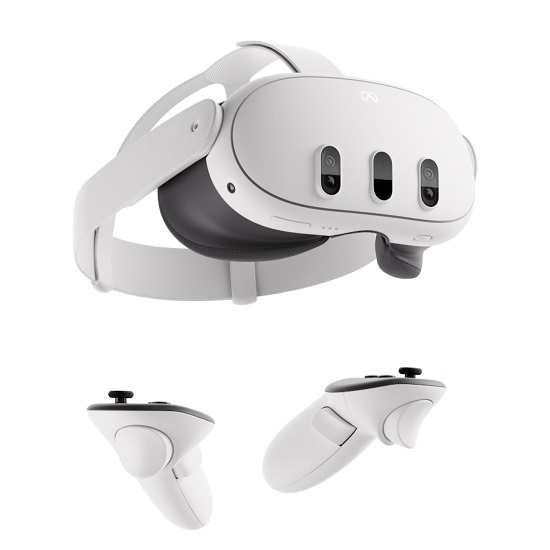
So, after many years of thinking about it, I finally broke down and bought myself a Meta Quest 3 VR headset.
The price, while not inexpensive, was reasonable... at least a lot more reasonable than the Valve Index or even (perish the thought) the Apple Vision Pro heaset.
The Quest 3 can play games locally stored in its 512 GB of storage space, or it can connect to my PC to play VR games from my Steam Library. This means I can play local games like Beatsaber (one of the /best/ VR games of the day) or try my hand at impressive VR titles like Alyx (Steam's VR title from the Halflife 2 series). This works very well, even linking to my PC that Microsoft claims is too old to run Windows 11 (which really irks me -- I'll probably go into it some other time).
The living room in our apartment is just big enough to offer the /2m x 2m/ area that one needs to play VR games properly, so I'm having quite a bit a fun.
I went to BestBuy today (on /Boxing Day/) to buy a Quest 3 Elite Strap with battery to get a slightly more comfortable headband and slightly more battery capacity, so I'm all set.
Beyond games, the virtual worlds that Meta are trying to create include entertainment (like concerts -- Charli xcx is having a VR concert tomorrow night in Meta's World) and various chat and activities rooms. I'm not sure I'll be one to experience this much, but the look of some of the music concerts I've briefly attended was quite impressive.
So, will VR be just a passing fad? It does require quite a bit of hardware, but I feel that the Quest 3 might be one of the devices that enables the masses to try it. Heck, Costco had a whole stack of Quest 3S boxes on display when my wife and I went there on December 24th.
I'll keep you all posted.
/games | Posted at 23:46 | permanent link
Sun, 25 Jun 2023
It's just been so long since I've posted something here, so let's give you all some news.
Three years ago, I replaced the Seagate 8TB external USB disk that I used on my home file server to perform weekly semi-offline backups with another Seagate disk after it had failed.
Well, the latest 8 TB Seagate disk failed again (it developed bad sectors). So this time, I bought a WD external USB disk for my backups.
So, once again, this is what I did to replace the disk:
Unmount the ZFS volume
# zfs unmount /localbackup or # zfs unmount datasink
Disconnect the old drive
Destroy the old ZFS pool
# zpool destroy -f datasink
Shutdown, connect the new drive, and reboot
# shutdown -p now ... connect the drive and then reboot
New disk ended up as da0 :
da0 at umass-sim0 bus 0 scbus9 target 0 lun 0 da0:
Fixed Direct Access SPC-4 SCSI device da0: 400.000MB/s transfers da0: 7630885MB (15628052480 512 byte sectors) da0: quirks=0x2 Set up the new disk for ZFS
# gpart destroy -F da0 # gpart create -s gpt da0 # gpart add -t freebsd-zfs -a4k -l WD8TB da0 # gnop create -S 4k /dev/gpt/WD8TB # zpool create -f -m none datasink gpt/WD8TB # zpool export datasink # gnop destroy gpt/WD8TB.nop # zpool import -d /dev/gpt datasink # zpool status # zfs set mountpoint=/localbackup datasink
Run the local backup procedure once again
# /root/localbackup.sh
Et voila! It was done.
I then ran my local backup procedure once again and we're back in business.
I should also mention that on /March 11th 2023/, I've switched from a 400 Mbps cable connection for my home internet connection to a 1Gbps fibre connection. This is a side-effect of my Internet Service Provider (Ebox.ca) being bought out by Bell and hence wanting its customers to use Bell's fibre infrastructure instead of Videotron's cable infrastructure.
Our building in downtown Montreal is wired for both Videotron and Bell, so it was relatively painless to switch.
The new speed is nice, especially since it now costs me a bit less for 1 Gbps than it used to cost me for 400 Mbps.
/FreeBSD | Posted at 20:53 | permanent link
Thu, 14 Jan 2021
eBox e-mailed me tonight to let me know that my new vCable 400 Internet connection had been activated.
So after watching the hockey game on TV, I connected my new technicolor TC4400-AM modem onto the coax cable with my old Videotron modem used to me connected, and within a few minutes my new internet connection was indeed up and running.
So after checking that everything was up and running properly, I ran the olde Ookla speed test to see if the speed was as advertized.
Whoa! I now get 454 Mbps download and 56 Mbps upload. This is nice.
It's also almost 3x the speed I had before for 30% less money monthly (to be fair, I've also changed some services, but rather minimally).
This is a nice upgrade... only thing left to change is the outgoing SMTP server in my Thunderbird connection, and then I'll be done with the internet connection.
Later on tomorrow, I'll configure the eBox TV app on my Sony Bravia Android TV: apparently, I will no longer need a set top box and my TV will be able to manage the eBox TV connection directly. I can't wait to try this out and see, but now it's late so time to go to sleep.
Oh, and until I cancel my Videotron contract, my old TV service still works, so no huge rush to migrate (except for the fact that as of today, I'll be paying twice for the service).
Good night all!
PS. Ah ha. There was more to do: not only did I need to fix the /etc/hosts.allow files on my internet servers to allow access from home, but I also needed to fix the SPF records for both of my domains to authorize e-mail coming from eBox's SMTP servers. I've cleaned up the hosts.allow file pretty heavily, so I may need to go back and authorize my mobile phone and such... Sigh, there are always little things left and right.
/admin | Posted at 01:24 | permanent link
Fri, 01 Jan 2021
So it's official now... 2020 is hindsight!
Now, who could have guessed when 2020 came around that it was going to be such a strange year? The year of a global pandemic.
The year started quite normal, we even went on a trip in the Carribean last February! And then, wham! Suddenly everyone was confined and we couldn't see anyone nor go anywhere. We all learned to wear masks and to be weary of our neighbors. Everyone who could switched to teleworking and "You're on mute!" became the most popular phrase of the year. Amazon, Skip the Dishes, and all of the local delivery services started making tons of money, while local restaurants and hotels were struggling.
But who could have guessed? Well, now it appears pretty obvious that all the signs were there... I guess hindsight really is 20/20.
Well, let's hope it's all over and that 2021 will treat us better: that we'll be able to have coffee with colleagues once again. That we'll be able to have lunch with friends once more. That we'll be able to hug family and relatives again.
So here's hoping for a nice, fun, friendly, and healthy 2021.
...and while I'm in wishing mode, why not a Stanley Cup in Montreal? One can always dream :-)
| Posted at 18:05 | permanent link
Thu, 31 Dec 2020
So, this is the last day of 2020, and what a year it has been. The COVID-19 global pandemic has certainly been extremely disruptive to most people's daily lives. Many of us found ourselves having to set up semi-permanent home office spaces for teleworking, and the companies that didn't have proper remote work infrastructures found themselves facing significant difficulties.
And that's not even mentioning industries such as restaurants, travel, and hospitality where entire companies have found themselves in dire straights and people have lost their jobs in droves.
Through all of this, I found a new and fascinating job running the IT department at my alma mater, so overall 2020 has been a good and positive year.
From a technical point of view, we're just about to leave our current internet (and TV) provider to adopt ebox. We'll be moving up to a 400 Mbps connection, which is great. Hard to believe that our first permanent internet connection in 1995 was a 0.014 Mbps modem link (a 14.4 kbps modem connection) to Interlinx that connected our little Unix machine to the Internet for real for the first time.
EBox seems like a solid outfit. I'll let you know more in 2021 once I've completed the connection and activated the TV and Internet services.
Cheers to all of you, and here's hoping that 2021 is less quirky than 2020!
/admin | Posted at 16:33 | permanent link
Fri, 25 Sep 2020
Replacing the external backup drive on my home server
A couple of years ago (OK, maybe more like 3 years ago), I bought a Seagate 8TB external USB disk that I added to my server for semi-offline backups. I formatted it with ZFS with neither mirroring, nor RAID, and put in place a script every Sunday night that copied the entire content of the server onto the external drive using 'rsync' in case my server had a catastrophic failure even though the 4 drives are in a RAID5 configuration.
This being said, the 8TB external Seagate drive got corrupted this week, and so I just threw it away and bought a new one.
As a reminder, here's what I did to install it in my server:
1) I disconnected the bad drive
2) I destroyed the datasink zpool
% zpool destroy -f datasink
3) I rebooted and connected the new drive (which ended up as da0), and then:
% gpart create -s gpt da0 % gpart add -t freebsd-zfs -a4k -l seagate8TB da0 % gnop create -S 4k /dev/gpt/seagte8TB % zpool create -f -m none datasink gpt/seagate8TB.nop % zpool export datasink % gnop destroy gpt/seagate8TB.nop % zpool import -d /dev/gpt datasink % zpool status % zfs set mountpoint=/localbackup datasink
and, to check if the drive is setup properly for 4k blocks:
% zdb | grep ashift
it should be set to 12.
I then ran my local backup procedure, and it copied the content of the server onto the external USB drive in about 12 hours.
Crisis averted.
P.S. I probably ought to mention that I take a snapshot of my ZFS partitions every hour and keep (some of) them around for a couple of years. That's a nice feature of ZFS!
/FreeBSD | Posted at 21:35 | permanent link
Fri, 08 Nov 2019I've been running FreeBSD for years, but I've always run it from a console.
Having recently recouped an old-ish PC that was still quite worktable, I've
recided to install a FreeBSD desktop onto it to see how well that would work.
I considered trying the PC-BSD route, but it became TrueOS and then Trident,
so that does not inspire confidence in its resilience... perhaps if this all
gets too intricate, I'll try GhostBSD).
Anyway, so here's what I did to get a FreeBSD desktop machine:
a) Downloaded FreeBSD-12.0-RELEASE onto a DVD from the freebsd.org site and burned it onto a DVD (could have gone the USB stick route also). This was last October... by now I'd use FreeBSD-12.1-RELEASE of course :-)
b) Booted from the DVD and selected option 1 (multiuser)
c) Selected "Install" to set up this new machine
d) Continued with default keymap (though I'll probably change that later on, as I always prefer the equivalent of 'US International'
e) Gave the name a simple name: veneer.rax.org
f) Selected just 'lib32' as an optional component (don't need sources ports, or kernel debugging on this small desktop computer)
g) Went for 'Auto (ZFS)' for the file system as the machine has at least 4 GB of RAM
h) Then I gave FreeBSD the whole disk rather than partitioning it.
i) I chose 'GPT' as the partion scheme for the disk
j) I accepted the proposed disk setup and hit
k) And hit
l) Once the disk was partitioned, I chose a password for the root account
m) This computer is connected to my LAN via Ethernet, so I selected the Ethernet network interface to configure the network for my new machine
n) I chose to configure IPv4 for this interface (I don't have IPv6 set up on that LAN anymore)
o) And then asked to get an address via DHCP (usually, I give my machines fixed addresses, but this was only a simple test)
p) I then indicated that I didn't wish to configure IPv6, as I don't have IPv6 configured properly on this LAN anymore
q) I put in my domain name and prefered DNS servers on the Network Configuration page
r) Selected my timezone: America > Canada > Eastern - ON, QC
s) 'EDT' was what I was looking for
t) I skipped setting the date (it was OK)
u) I skipped setting the time too (it was also OK)
v) I activated sshd, moused, ntpdate, ntpd, and powerd only
w) Selected none of the System Hardening options
x) Added no users to the system at this point (yes, I know, this isn't best)
y) And then, I hit
z) No more changes required
zz) Reboot!
After rebooting:
a) adduser to create 'bill' account
b) Add some packages: sudo, zip, unzip, zile, perl5, python3, rcs, rsync, smartmontools
c) In the file "/usr/local/etc/sudoers", uncomment line 90 to enable "members of group wheel to execute any command" (with a password, obviously).
d) Enable dbus in /etc/rc.conf by adding: dbus_enable="YES"
e) Add some useful fonts: pkg install x11-fonts/anonymous-pro x11-fonts/artwiz-aleczapka x11-fonts/dejavu x11-fonts/inconsolata-ttf x11-fonts/terminus-font x11-fonts/cantarell-fonts x11-fonts/droid-fonts-ttf x11-fonts/doulos x11-fonts/ubuntu-font x11-fonts/isabella x11-fonts/ecofont x11-fonts/junicode x11-fonts/stix-fonts x11-fonts/webfonts
f) Install the graphical user interface pkg install xorg
g) If using an NVIDIA card, do this: pkg install x11/nvidia-driver pkg install x11/nvidia-settings pkg isntall x11/nvidia-xconfig then echo 'nvidia-modesetload="YES"' >> /boot/loader.conf then echo 'linuxenable="YES"' >> /etc/rc.conf echo 'kld_list="nvidia-modeset"' >> /etc/rc.conf then Reboot then Run nvidia-xconfig to get a base xorg.conf in /etc/X11/xorg.conf Pull it up in your favourite text editor and add the Module section to enable the freetype2, glx, type1 extensions In /etc/X11/xorg.conf: Section "Module" Load "freetype" Load "bitmap" Load "type1" Load "glx" EndSection Later on, once youre booted into the graphical environment, you can use nvidia-settings
i) select the right default sound device, based on where you want your sound to come out from: cat /dev/sndstat spot the "default entry" and if it's not the right one, edit /etc/sysctl.conf and add the line: snd.... (check the file on my computer) then try to make it work: fetch a PCM file from the internet cat the-pcm-file > /dev/dsp and check which /dev/pcm file has been created Hopefully sound works at this point, and if not, find a troubleshooting guide on the Web
j) Set up KDE: pkg install x11/kde5
k) Use KDE. Just put, in your .xinitrc file: exec startkde
l) Install useful packages: www/firefox, www/vlc
m) At this point, you can just use startx to launch into the KDE desktop and you should have a functional FreeBSD desktop with Firefox and all. You can also install SDM to have automatic graphical login start at boot time.
It seems long, but wasn't difficult to do on this old PC.
Note: If you have Intel Graphics, try just to type "startx"... it ought to work, and if you have an ATI graphics card look for the appropriate driver
/FreeBSD | Posted at 08:31 | permanent link
Sat, 20 Jul 2019
First blog entry of 2019: it's been a while, but I cannot not blog on this 50th anniversary of mankind's first steps on the moon.
I was 7 years old when that happened, and that feat created an incredible interest for science in my whole generation. One of the first programs I had on my programmable calculator was a lunar lander program where you had to determine how much fuel to burn so that you could land safely at Tranquility Base.
These days, it's nice to see SpaceX and others rekindling the interest for space. I hope I stick around long enough to see us try to land on Mars.
I wish successive generations can both take care of this planet and still continue trying to reach beyond: to explore and advance our knowledge of science and the universe.
So tonight, I look up to the sky and remember the little boy who was fascinated with what we could do with technology -- and ended up studying computer science, which brought its own set of amazing discoveries, inventions, and evolutions.
Congratulations to NASA and all of the space pioneers who helped make this possible.
(Image credit to NASA)
/misc | Posted at 21:53 | permanent link
Mon, 31 Dec 2018
Moving a Running FreeBSD system from i386 to amd64
Recently, the little Soekris net6501 machine that I use as a home server for DNS and other similar functions decided to die after many years of useful service (it's a known problem of net6501 machines unfortunately; at some point they just self-brick and refuse to reboot :-(
So I took the Gigabyte Brix GB-BXi3-4010 that I had been using on my TV in the living room and simply removed the Windows 10 mSATA drive from it and inserted the mSATA drive from my net6501 into it and Poof! FreeBSD booted fine and It Just Worked.
Therefore in no time at all, poterne (my little home server) was back in action and no one at home even noticed, since we haven't been using the little Brix much since we bought a 4K TV that has Netflix and Youtube in firmware (maybe more on this some other day).
However, the Intel Core i3-4010U Processor at the heart of the little Brix computer is a 64-bit part, so I'd like to move FreeBSD on poterne from i386 to amd64 so that it can use all of its 8GB of RAM, since I've noticed that dmesg presently says:
real memory  = 8589934592 (8192 MB)
avail memory = 3574235136 (3408 MB)
So I searched the Internet for "freebsd upgrade i386 to amd64" and I found a few pages describing successful upgrades. Actually, most of them recommended not to do it and just reinstall, but I decided to go for it anyway.
The methods I found recommended upgrading by recompiling, so I fetched the FreeBSD 12.0-RELEASE installation media and installed the source code onto my little server. Then I started to recompile, but it took ages (maybe because I put the source and object files on the external USB disk?), so I decided to redeploy from RELEASE binaries:
cd /tmp
fetch https://download.freebsd.org/ftp/releases/amd64/amd64/ISO-IMAGES/12.0/FreeBSD-12.0-RELEASE-amd64-dvd1.iso
mdconfig -a -t vnode -f /tmp/FreeBSD-12.0-RELEASE-amd64-dvd1.iso
mount -t cd9660 -o ro /dev/md0 /mnt
cd /
The release tarballs are in /mnt/usr/freebsd-dist/ (such as src.txz, base.txz, etc.)
Of course, I then used rsync to make a backup of my server onto my local NAS machine, in case anything went wrong.
Then, I proceeded with the migration process based on recipes from various websites (notably https://wiki.freebsd.org/amd64/i386Migration).
Turning the swap partition into a 'miniroot' seemed like a good idea, so I did that... My swap partition is is 6GB, so that worked well (6GB was enough for the 2GB of RAM I had on the Soekris net6501, but may could a bit short with the 8GB of RAM from the Brix... but then again, I probably won't need any swap space on the new machine with 8GB of RAM for a little headless server like poterne).
swapinfo -h
swapoff /dev/ada0p2
sed -i.bak -e '/swap/s;^;#;' /etc/fstab
newfs -U -n /dev/ada0p2
mount /dev/ada0p2 /media
... here, I extracted various files from the FreeBSD-12 release
... and copied various files from _/_ onto _/media_ (notably from /etc)
... sorry, I didn't write it all down :-)
file /mnt/bin/echo
cp /etc/fstab /media/etc/fstab

umount /mnt ; mdconfig -d -u0
After setting up the miniroot on /dev/ada0p2, I rebooted from there and mounted the real filesystems onto /mnt and copied over the files from the miniroot to /mnt.
I then rebooted with the new system and cleared the pkg cache and reinstalled all of my packages.
In the end, it worked fine and poterne.rax.org is now running in 64-bit mode.
/FreeBSD | Posted at 11:10 | permanent link
Mon, 12 Nov 2018
Setting up my new home NAS with FreeBSD 11.2

So, I've got my new HPE Proliant Microserver Gen10 last summer, but I hadn't had time to set up it yet.
I am setting it up with FreeBSD. (It's a sobering thought that FreeBSD is now 25 years old: I've been running it since the very first version, coming from 386BSD and Microport System V/AT before that.)
I've put the 4 Seagate drives in the bays and inserted a USB key with
FreeBSD 11.2 on it in the internal USB port. As reported in the previous
blog entry, I had to add a "/boot/loader.conf" file with
hw.pci.realloc_bars="1"
in it.
Then, I needed to:
Install packages with pkg: perl5, zip/unzip, zile, mutt, rsync, sudo, samba, and smartmontools
Copy the user accounts from my old proliant server onto the new datasink server. I haven't decided yet if I will shut down the old server or if I will just let it run on my network.
Install the 4 Seagate drives under ZFS... more on this below.
Copy the files from my old proliant server to the new one.
Activate NFS on the new server. With ZFS, I don't need to start the usual NFS server processes, as ZFS supports NFS sharing directly (see below).
Move the large external USB drive that I use for weekly rsync backups onto the new machine.
Configure regular backups, monitoring, etc. on the new server.
Exchange the names proliant and datasink on the two machines. Verify that the Windows machines and the Macs on my home network can access the new server transparently.
And that should be it.
Setting up the 4 Seagate disks with ZFS
Here is how I set up the four 6TB disks on that new server:
Decided to use the 4 drives in a RAIS-5 configuration, which allows me to recover from a single drive failure. If the Microserver had had 5 drives, I would have used a RAID-6 configuration, but with 4 drives, it seemed like an exageration.
Decided to create a single large ZFS pool with all of the drives in it.
Also decided to limit the number of ZFS filesystems I create in my ZFS pool. For the limited usage I make of my little home server, I haven't found much use over the years for splitting the disk space pool into multiple logical filesystems, apart from sharing via NFS, so this time, I'm going with just a few filesystems: a large one called
/data, a smaller one for user files called '/homes' that will be exported via NFS, and the usual/varand/usr.However, I've been running a ZFS snapshot script on my machine for the past few years (as explained here), and I've found it quite useful. So I decided to continue with them. So I must account for enough freespace in the ZFS pool for all of the data from the snapshots.
For other uses, I'll create symbolic links into the
/datazpool for/backupsand others.Note: I have used the
/dev/diskid/*devices to set up my ZFS pool, rather than the/dev/ada*devices. If I get a drive failure or take a drive out, I find the renumbering of ada devices to be a scary proposition. Similarly, when I use external USB drives, I give them GPT names and use these rather than/dev/da*which can change when you unplug/replug the USB connectors.
So, here are the commands that I've run to initialize the disk space on my new server, conserved here for future reference:
Check out which disks we have available:
ls /dev/diskid
Create the ZFS pool (the ashift option specifies the drives have 4KB blocks)
zpool create -o ashift=12 -m /zfspool zfspool raidz diskid/DISK-ZAD4QZAT diskid/DISK-ZAD4RS61 diskid/DISK-ZAD4V4N3 diskid/DISK-ZAD4V4N9
(question: why have a mountpoint for a ZFS pool?)Create the filesystems in my ZFS pool:
zfs create zfspool/data mountpoint=/data
zfs create zfspool/var mountpoint=legacy
zfs create zfspool/home mountpoint=legacy
zfs create zfspool/usr mountpoint=legacy
zfs create zfspool/tmp mountpoint=legacyCopy the existing stuff onto the new partitions and set the real mountpoints:
foreach i ( var home usr tmp )
mount -t zfs zfspool/$i /mnt
( cd /$i ; sudo rsync -aHv . /mnt/ )
umount /mnt
zfs set mountpoint=/$i zfspool/$i
endShare the
/homedataset:zfs set sharenfs=on zfspool/home
(check that this works... I am not sure)
/FreeBSD | Posted at 07:39 | permanent link
A new HPE Proliant Microserver
Last summer, one of the disks on my Proliant Microserver started generating some errors, so I decided to replace it with a newer generation, and I bought the Gen10 of the HPE Proliant Microserver.
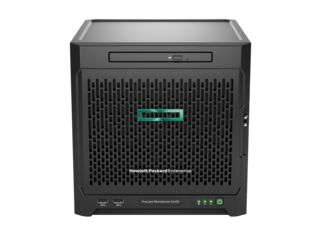
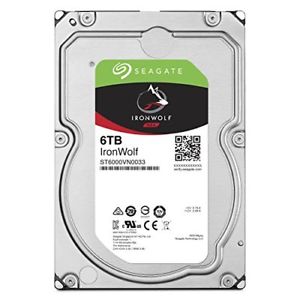
It's a nice piece of hardware. I bought it without any disks inside, and bought 4 Seagate 6 TB NAS drives from Amazon on Prime Day.
So the question was: should I put FreeBSD on that machine, or should I install FreeNAS given that it's mostly used as a file server for my home network?
After some back and forth, I decided to put FreeBSD onto it.
Now, a bit of a nasty surprise awaited me: the HPE Proliant Microserver Gen10 does not boot FreeBSD out of the box. A known issue prevents it from booting the GENERIC kernel as is. The bug is described here, and unfortunately it doesn't look like it's going to be fixed in 11.2, 12.0, or beyond (though it seems like this patch ought to fix the issue).
However, the problem is easy enough to fix: it just needs the FreeBSD
system to have a file called /boot/loader.conf that contains the
following line:
hw.pci.realloc_bars="1"
and then the O/S just boots normally.
I have put the 4 Seagate drives in the enclosure, and added a small USB thumbdrive in the internal USB port to act as the boot device. I will format all the drives as a ZFS RAID-5 configuration and put all of the data and important files onto there.
The configuration of the new fileserver is the topic of the next blog entry.
Question: my experience with USB thumbdrives is so-and-so... after a while they just seem to become corrupted. I see three possibilities to alleviate that:
Have 2 thumbdrives and periodically (daily?) rsync the content of the real live one onto the other. If the first one ever becomes corrupted, just discard it and use the second one, which should be fine.
Use nanoBSD to produce an O/S that will seldom write onto the USB thumbdrive and therefore greatly extend its life.
Ignore the problem and hope the USB thumbdrive never fails (of course, making backups of the USB thumbdrive onto another system so that if it did fail, I could create another one from the backup andi bring my fileserver back to life).
Stay tuned to see what I will decide to do next :-)
/hardware | Posted at 01:05 | permanent link
Sun, 11 Nov 2018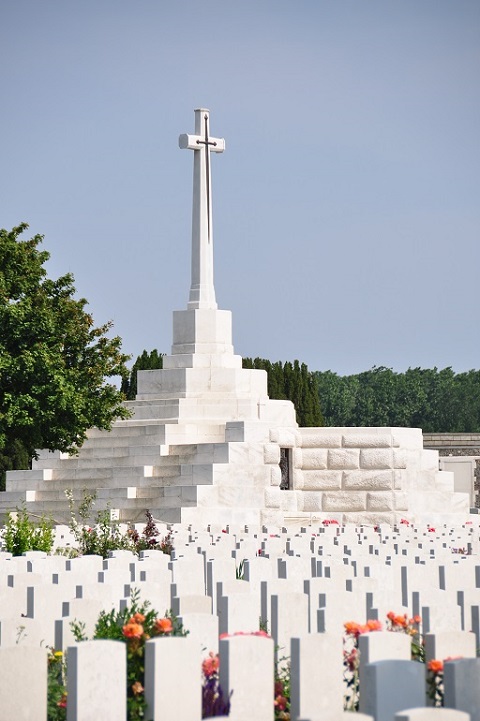
Today is the 100th anniversary of the signature of the armistice which ended World War One.
I had the opportunity to visit the beaches of Normady in 2011, including the Canadian monument at Vimy and the cemetaries where many of our fellow countrymen are buried having given their life in service to their country to fight for liberty.
On 11/11, we like to remember them and all of the brave soldiers who have given (and are still giving) time and effort to help protect us in war and peace alike.
War is always horrible and politics on a global scale is always complicated. But on this Remembrance Day, let's all find a moment to remember all of those who have fought and are fighting for us.
LEST WE FORGET.
And on this special day, let's all remember John McCrae's poem, "In Flanders Field":
In Flanders fields the poppies blow
    Between the crosses, row on row,
  That mark our place; and in the sky
  The larks, still bravely singing, fly
Scarce heard amid the guns below.

We are the Dead. Short days ago
We lived, felt dawn, saw sunset glow,
  Loved and were loved, and now we lie
      In Flanders fields.

Take up our quarrel with the foe:
To you from failing hands we throw
  The torch; be yours to hold it high.
  If ye break faith with us who die
We shall not sleep, though poppies grow
      In Flanders fields.
Peace to all.
/misc | Posted at 17:52 | permanent link
Sat, 13 Jan 2018
OK, so a few days ago, I complained that it was really cold in Montreal over the Christmas holidays. It was regularly around -21 degrees Celcius (or below zero for our Fahrenheit-using friends), and when you add the windchill factor, it actually felt like -40.
Now, for the past couple of days, the temperature has shot up to above the freezing point. Way above. And it's been raining. But winter is coming back and it's freezing today. I don't relish the thought of going outside later on this morning and seeing how all the streets with be covered in ice :-(
I like winter, but I don't like rain in winter.
Tssss.
/misc | Posted at 06:49 | permanent link
Mon, 01 Jan 2018
...and suddenly 2018 is here. Lots of expectations for that new year.
It started oddly: Sylvie has a big cold, so she stayed under the covers and we stayed at home together. I think it was our first New Year's celebration with just the two of us.
At midnight, I got an SMS from Olivier, and when I tried to reply: poof! Message failed. Tried sending messages for about 45 minutes, and the vast majority just failed.
I am not sure if it's the local base station in my part of downtown Montreal that too busy, or if its the Rogers cellular network that was overwhelmed, or whether it's the whole cellular infrastructure that is knackered, but it is quite annoying.
Of course, in the meantime, Apple's iMessage service worked fine, as did e-mail, Twitter, and a lot of other TCP/IP-based services I'm sure.
I'm quite disappointed at the Rogers' cellular infrastructure, though.
Oh well, let's not be overly critical on this new year's day.
Happy New Year! May 2018 bring health, happiness, and success to you and your loved ones all year long.
Best wishes!
/misc | Posted at 01:18 | permanent link
Sun, 31 Dec 2017
So, it's the final day of 2017.
Quite a year!
Lots of things have happened this year in our family:
- David has graduated from university and gotten a job in his chosen field
- He and Jessie bought a house and moved in
- And they now have a son, which makes me a grand-father
And that's without talking of other news like new nephews, new old colleagues, crazy markets, and the election of Donald Trump in the US!
Quite a year, but a wonderful year.
On the personal technology side, I am back in the 4K club with a vengence: my new PC has a 32-inch 4K screen, and I have a new 60-inch 4K TV in the living room. If you remember well, I got a 4K TV in 2014 for my birthday in Paris, but as we moved back to Canada at the end of May 2014, I could not bring it with me as electricity and TV broadcasting are incompatible between France and Canada. So I am back in the 4K world, and I am quite pleased with it so far. Thanks to NetFlix for offering 4K content, as my local cable company offers very limited content at 4K (they do have a 4K Christmas Fireplace Video :-)
Oh, I guess I also ought to mention that I bought a new camera this year (is that still a thing?). Just before our trip to Las Vegas and the Grand Canyon last August, Sylvie and I bought a Nikon D7500 20.9 megapixel APS-C digital camera. I admit that nowadays we take most of our pictures with our cellphones and that our Samsung Galaxy S6 and S8 phones take very decent pictures, but with a grandson on the way, we felt that it was important to get a real camera that would let us take even more beautiful pictures than just our phones.
One day, I should make a list of all the cameras I've owned. Just in the Digital Camera age, my main cameras have been the Nikon Coolpix 950 (bought in San Francisco in 1999), the Olympus E10, the Nikon D70, the Nikon D90, and now the Nikon D7500. Of course, that doesn't count the smaller Minolta cameras we've had like the Dimage X50 (we've had 3 or 4 over the years that Sylvie carried in her purse in our travels).
So in closing, I hope you all had as good and eventful a year in 2017 as we've had in our family. I'm looking forward to writing more here in 2018 than I've taken the time to this year.
See you soon and best wishes!
/misc | Posted at 09:07 | permanent link
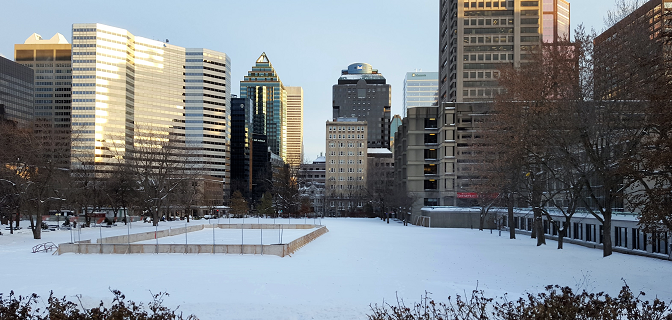
Oh boy, is it cold outside in Montreal.
I've enjoyed a full week of vacation to close 2017, and it has been great and quite relaxing... But it has been bitterly cold all week in Montreal, and it looks like it's going to continue into the first week (or weeks?) of the new year.
Temperatures in Montreal are below -20 degrees Celcius (that's sub-zero for those still using Fahrenheit), and with the wind chill factor, it feels like -40 or so.
Brrrr!
Now mind you, I like the cold, so I'm not overly displeased with this. But that is because we've got good insulation in our walls and solid heating in our home, as these types of brutal temperatures will kill you in no time at all if you stay put.
Brrrr!
/misc | Posted at 08:34 | permanent link
Fri, 06 Jan 2017Since I've moved back to Montreal from Paris, I haven't had time to re-set the IPv6 part of my LAN, which had been running off of a SIXXS tunnel for a few years.
The good news, is that my local ISP (Videotron) has been allowing IPv6 to the home for a few years already though 6rd... it's not yet native IPv6 to the home, but as far as I can tell it seems functionally useful (information available here).
So, I activated 6rd on my Asus router and got an IPv6 address as expected. This is good, so I will set up my home server (DNS, web, etc) to also work with IPv6 and move back to a hybrid IPv4/IPv6 home network... need a couple of days to work on that, so it will probably not happen before spring (ha!).
Still, it's good to see that IPv6 is spreading. I am quite impressed by Google's statistics here... seems like over 15% of users access Google through IPv6 today. That's a lot more than I expected! Glad to see that the transition is really happening.
/inet | Posted at 02:58 | permanent link
Sun, 01 Jan 2017
Welcome to the new level, welcome to 2017, welcome to the year of the 150th anniversary of Canada.
I'm just about old enough to remember the centennial celebration in 1967 in Montreal, with the International Exposition Expo 67, so even though I've lived abroad for a number of the intervening 50 years, I feel some sort of connection to this event and I will certainly seek out some celebrations during this year to show I feel that this is a most excellent country :-)
It's been fun being along for the ride for the past 50 years, and while it's a bit sobering to reflect that I will most likely not be around anymore in 2067 for the 200th anniversary, I intend to be along for a great many years still.
So, to my friends all over the world and all over this country: I wish you a happy 2017, and I invite you to join me in wishing this country a happy anniversary!
| Posted at 17:21 | permanent link
Wed, 09 Nov 2016Hmmmm. At this late time of night (or early time of the morning), media outlets have called the election for Donald Trump.
Apparently, Hilary Clinton has phoned him to concede the election, even though she will not give a speech tonight.
Throughout the primaries and the election, pollsters have underestimated support for Donald Trump. Seems to me like the biggest losers in this election are pollsters and people who try to interpret polls: they just seem to be consistently wrong these days. Actually, this has also been true regarding #Brexit (and the last Canadian election also).
Seems like pundits consistently underestimate the degree to which voters are upset these days.
Listening to Donald Trump's victory speech... and then off to sleep. Tomorrow will be crazy in the markets.
Good night to all.
/misc | Posted at 02:52 | permanent link
Sat, 15 Oct 2016Very busy time lately, but I'm glad to see that FreeBSD 11.0-RELEASE is now out, so I started upgrading my systems to this latest release this morning. It is quite easy:
/usr/sbin/freebsd-update -r 11.0-RELEASE upgrade
/usr/sbin/freebsd-update install
then reboot
/usr/sbin/freebsd-update install
pkg upgrade
and that's it.
On one of my Soekris boxes (the net6501) that has an external USB disk for backups and general storage, the new kernel seems to try to check the filesystem faster than it used to... this means that it tries to fsck the filesystem before the USB disk has been mounted, and hence I get:
THE FOLLOWING FILE SYSTEM HAD AN UNEXPECTED INCONSISTENCY:
        ufs: /dev/da0s1a (/usbdisk)
Warning! Some of the devices might not be available; retrying
Waiting 30s for the root mount holders: usbus7 usbus3
uhub7: 3 ports with 3 removable, self powered
and then it retries and works fine. The filesystem is tagged as 'late' in fstab, but that doesn't appear to do the trick.
OK, back to PuTTY to complete the upgrade of my various systems.
/FreeBSD | Posted at 08:15 | permanent link
Sun, 31 Jan 2016I've lived through many generations of laptops, from the Osborne 1 through various Toshibas, HPs, Dells, IBMs, Lenovos, and Macbooks to today's Ultrabooks and various tablets.
Of course, using a mouse with a laptop has always been annoying: you're trying to use the laptop on a plane (on one of those ridiculously small tray tablets), and there is no place to use a mouse properly. Various companies have tried various tricks to make the experience a bit easier: tiny mice (Kensington has produced those for years), trackballs, ... but with limited success. The only one that I found I could use proficiently, is the IBM trackpoint.
However, in recent years, probably due to the influence of Apple MacBooks, more and more laptops come with touchpads (or should I say, all laptops come with touchpads?).
Sigh.
I find touchpads really annoying as devices to interact with laptops. It's difficult to reliably do many of the operations that I need to do when using a computer:
- accurately selecting things on the screen
- dragging and dropping things
- doing multiple selections
- and many more...
I am even annoyed by my Lenovo Yoga laptop at work, even though it has a trackpoint in addition to the touchpad, but I find that even just as a "right and left button" replacement, the touchpad is not working as reliably as a pair of dedicated buttons :-(
I still prefer a trackpoint nib with two buttons over a touchpad, even if some of the gestures on the touchpad are nice (e.g. to zoom on a picture).
However, if I look at the industry, this is clearly a battle that is not worth fighting: this ship has sailed and touchpads are definitely part of the modern laptop configuration these days.
Grin and bear.
/hardware | Posted at 13:18 | permanent link
Thu, 31 Dec 2015As 2015 comes to a close, we're once again heading to Henri's for our usual end of year revelries.
It has been quite a year, with lots of changes. Let's hope 2016 proves to be positive for us all.
So once again, I wish you all a very happy, healthy, and successful new year.
Cheers
/misc | Posted at 18:44 | permanent link
Thu, 10 Dec 2015In this age of ubiquitous technology and the Internet of Things, I must admit that I have quite a few misgivings about the rough edges of the technologies that we're introducing in our lives...
Some recent caveats:
- I had 4 winter tires installed on my BMW last Monday. By Sunday night, a warning popped up on my car's central display telling me that the pressure of all 4 tires was incorrect. The dealer's advice is "oh, just reset the warning... that happens frequently". Sigh, either the technology is not intelligent enough to take a wheel change into account, or their processes are in serious need of improvement.
- I had a 2014 Lexus ES 300h car with some sort of front collision avoidance feature. Well, twice in the one year that I owned the car, it interpreted a road surface anomaly (a metal plaque used by road repairs teams to cover up holes in the road during repairs) as an obstacle in the road and suddenly applied the brakes and locked the seat belts while normally driving/accelerating on the street. Nothing bad happened either times, but it was quite unnerving and could have been quite dangerous (I could have been rear-ended).
- When we moved into our new apartment last year, I installed new lamps (since our previous lamps from Europe didn't make the trip with us as they were 240V)... I couldn't resist installing a couple of WeMo devices so as to remotely control some of my fixtures. Well, having changed phones a couple of times since setting those up, I now have 'programming' in those controllers that I cannot edit anymore... indeed, one lamp turns on at 00:00 daily and apart from reinitializing the device from scratch, the only option I have found is to set up a separate program to turn it off at 00:01 daily... yuck.
So this gets me thinking about self driving cars and how often I disagree with our GPS's recommended routes. I foresee much annoyance/frustration ahead for all of us poor humans in the upcoming IoT controlled world.
Sigh. Good technology is tough to get right!
Still, I am an incorrigible tech-addict :-)
/tech | Posted at 19:51 | permanent link
Sun, 08 Nov 2015
Adding a new USB disk to my FreeBSD 10.2 server
(I think that the stuff below is accurate, but do proceed with care if you're going to try it out... I could have made a mistake writing down the list of steps. Let me know if you spot any issue.)
I would like to add a new USB disk to my FreeBSD 10 machine. In the olden days, I used to use sysinstall, but that doesn't seem to be the modern way to do things these days.
Notably, I would like to "label" the drive, so that I can mount it with its logical name rather than its physical device name... this is particularly important for USB disks, as plugging and unplugging USB device ports may cause changes in device names, which could cause really annoying issues if fstab mounts the wrong device (as I've already written about on Feb 20th, 2012).
So, here is what one must do to set up a new disk for use on FreeBSD...
1) First of all, decide how you're going to name your device. Using volume names instead of just raw device names is highly desirable if you're in a dynamic environment (e.g. if you're going to be adding disks to the computer in the future -- including USB storage, devices may end up being renamed).
For USB disks, choosing good label names is important: you may want to replace a disk at some point if one crashes (so do not use the /dev/ufsid/... names) and/or you may have a CPU crash and you'd like to mount your disk onto some other FreeBSD system (so do not use the same names for your bootdisks on all computers, unless they are truly meant to be considered identical clones). This means that 'bootdisk' is probably not a great label, in case you ever need to mount it on another machine that also boots from a 'bootdisk'... 'myhostname-bootdisk' might be better, albeit a bit verbose.
I'm not sure if there are canonical policies for that sort of thing, but I'd be interested in hearing about recommendations in this area.
Now, getting to the actual set up of the drive.
2) connect the disk to the USB port, and check out the dmesg log to find out the correct device name, something like da0 or da1 (depending on whether it's your first USB or SCSI disk, or your second one, or ...)
# dmesg | tail
da0 at umass-sim0 bus 0 scbus6 target 0 lun 0
da0: <WD My Book 1230 1050> Fixed Direct Access SCSI-6 device
da0: 400.000MB/s transfers
da0: 1907697MB (3906963456 512 byte sectors: 255H 63S/T 243197C)
da0: quirks=0x2<NO_6_BYTE>
#
In this case, it's da0 and it's connected to a USB3 port (so it can do 400 MB/s rather than 40 MB/s for USB2).
As always: make sure you select the right device name, because formatting the wrong drive is bad and will cause your data to go away. If you want to check out which disks are present, you can type:
# camcontrol devlist
You can also use the usbconfig command to see what USB hubs and devices are present on your system:
# usbconfig
You may also want to use the 'mount' command to check which disks are currently mounted, but with volume labels being used instead of phycical device names, you may not see the 'real' devices names in there (e.g. /dev/ufs/bootdisk instead of /dev/da1 or something similar).
3a) Once certain which disk to use, if a UFS filesystem is desired, proceed thusly (if a ZFS filesystem is desired, move on to step 3b):
(note: /dev/XXX represents the new disk, such as /dev/da0 or /dev/ada1)
# dd if=/dev/zero of=/dev/XXX bs=1k count=2
# gpart create -s gpt XXX
# gpart add -t freebsd-ufs XXX
# newfs -U -L myvolume /dev/XXXp1   ; create a UFS filesystem with label myvolume on partition p1
# mkdir -p /mnt/newmountpoint
# mount /dev/ufs/myvolume /mnt/newmountpoint
This creates a whole disk for FreeBSD (such as a data disk). If you want to set up a disk with multiple filesystems, you can do something like:
(This creates a 'USB boot disk')
# dd if=/dev/zero of=/dev/XXX bs=1k count=2
# gpart create -s gpt XXX
# gpart add -t freebsd-boot -s 512k -a4k -l usbboot XXX
# gpart bootcode -b /boot/pmbr -p /boot/gptboot -i1 XXX
# gpart add -t freebsd-ufs -l usbrootfs -b 1m -s 2g XXX
# gpart add -t freebsd-ufs -l usbvarfs -a 1m -s 2g XXX
# gpart add -t freebsd-ufs -l usbusrfs -a 1m XXX
# gpart show -l XXX         ; check out the partitions that we're created
# newfs -U -t /dev/gpt/usbrootfs
# newfs -U -t /dev/gpt/usbvarfs
# newfs -U -t /dev/gpt/usbusrfs
Et voilą, finished. You may want to add a line to /etc/fstab to have /dev/ufs/myvolume mounted automatically at boot time. Always use volume label names instead of physical disk drive names, especially for USB drives where the disk drive name may change across reboots depending on what USB devices are plugged into the computer's ports and USB hubs.
3b) If a ZFS filesystem is desired instead, skip step 3a and proceed thusly (with /dev/XXX representing the new disk, such as /dev/da0 or /dev/ada1 once again):
(Once again, this creates a 'USB boot disk')
# dd if=/dev/zero of=/dev/XXX bs=1k count=2
# gpart create -s gpt XXX
# gpart add -t freebsd-boot -s 512k -a4k -l usbboot XXX
# gpart bootcode -b /boot/pmbr -p /boot/gptzfsboot -i 1 XXX
# gpart add -t freebsd-zfs -l usb0 XXX
    ...one can verify with 'gpart show XXX'
# zpool create -m /mnt zroot /dev/gpt/disk-main
Et voilą, finished.
4) At this point, your disk is up and running. Do not forget to use mount to make it available under FreeBSD, and to umount it before unplugging it.
Good luck!
Supplementary reading
You may want to check out http://www.macfreek.nl/memory/FreeBSD9withZFSbootdisk for more info. Furthermore, http://www.macfreek.nl/memory/FreeBSD9onSoekrisnet6501 may also be pertinent. And about ZFS, do check out: http://nex7.blogspot.ca/2013/03/readme1st.html and of course this: http://www.solarisinternals.com/wiki/index.php/ZFSEvilTuning_Guide
/FreeBSD | Posted at 01:02 | permanent link
Wed, 21 Oct 2015In the Back to the Future II movie, way back in the '80s, Marty McFly travels to the future... he travels to the 21st of October 2015.
It's amusing to be living tthat day "for real".
So we don't have hoverboards yet (not quite), but we have lots of technology that the '80s would find truly amazing... I often say that in IT we reinvent the impossible every 5 years.
Nothing really exceptional happened today in my segment of the universe, except for the fact that I've finally obtained a Bat.-Chat. 25t Tier X medium tank in the World of Tanks on-line game after many months of playing. It should be a fun tank to play.
Anyway, happy Back to the Future Day to all.
Cheers!
(p.s. it's still 2015-10-21 in Montreal as I write this :-)
/misc | Posted at 23:42 | permanent link
Wed, 24 Jun 2015
Personal missions for World of Tanks - June 2015
On January 15th 2015, World of Tanks introduced personal missions. I wanted to have a simple list outside of the game to keep in another window, hence this blog entry.
Later in 2015, Wargaming changed some of the missions, hence this updated list.
A) Operation StuG IV
Light Tank missions
LT-1: For Victory!
- Win the battle
- Be among the top 10 players on your team by XP
- (secondary) Survive the battle
LT-2: Reconnaissance
- Be the first on your team to spot 2 enemies
- (secondary) Survive the battle
LT-3: The Pursuit
- Cause damage to enemy vehicles at least twice by shooting them
- (secondary) Destroy an enemy vehicle by shooting or ramming it
LT-4: A Forced Halt
- Destroy a track of an enemy vehicle
- (secondary) The vehicle immobilized by you must receive damage by your allies
LT-5: The Forward Observer
- Spot an enemy vehicle and assist your allies in destroying it
- (secondary) Spot enemy vehicles and enable your allies to damage 2 vehicles spotted by you
LT-6: Battle Support
- Allow allies to damage 2 enemy vehicles by spotting them or destroying their tracks
- (secondary) Use the following equipment: Coated Optics or Binocular Telescope
LT-7: The SPG Hunter
- Spot an enemy SPG and cause damage or any critical hit to it
- (secondary) Survive the battle
LT-8: Get Out of Our Base!
- Participate in the successful capture of the enemy base or reset enemy capture points of your base
- (secondary) Win the battle
LT-9: Hawk-Eyed
- Spot 2 enemy vehicles before they spot you
- (secondary) Survive the battle
LT-10: The Maximum Result
- Finish the battle as the top player on your team by XP
- (secondary) Win the battle
LT-11: A Fair Fight
- Cause damage at least 4 times to enemies that are the same tier as your vehicle or higher
- (secondary) Cause at least 1000 HP of damage
LT-12: The Ghost
- Spot enemy vehicles and enable your allies to cause at least 500 HP damage to vehicles spotted by you. Remain unspotted at the moment when damage is caused.
- (secondary) Use the Camouflage Net equipment, and have a Camouflage that corresponds to the season
LT-13: The Key to Victory
- Spot enemy vehicles and enable your allies to cause at least 1500 HP damage to vehicles spotted by you or platoon mates
- Cause at least 1000 HP of damage (personally or with platoon)
- Can be personal or platoon
- (secondary) Personally survive the battle
LT-14: The Battle Watch
- Spot enemy vehicles and enable your allies to cause at least 2000 HP damage to vehicles spotted by you or platoon mates
- Can be personal or platoon
- (secondary) Personally survive the battle
LT-15: The Aggressive Recon Specialist
- Total damage caused and the damage caused by your allies upon your spotting or destroying a track must be at least 4000 HP
- (secondary) Survive the battle
Medium Tank missions
MT-1: First Steps
- Cause damage to an enemy vehicle
- Win the battle
- Be among the top 10 players on your team by XP
- (secondary) Survive the battle
MT-2: Good Hit!
- Fire at least 6 shots that cause damage to enemy vehicles
- (secondary) Destroy an enemy vehicle
MT-3: The Spearhead
- Cause damage to an enemy vehicle during the first 2' of the battle
- (secondary) Survive the battle
MT-4: Stay Still, Would You?
- Destroy a track of an enemy vehicle, and cause damage to the immobilized vehicle before the track is repaired
- (secondary) Destroy an immobilized enemy vehicle before its track is repaired
MT-5: Counter-Reconnaissance
- Destroy an enemy light tank by shooting or ramming it
- (secondary) Survive the battle
MT-6: Rapid Fire
- Cause damage to enemy vehicles of 3 different types
- (secondary) Survive the battle
MT-7: A Surprise Blow
- Destroy an enemy SPG
- (secondary) Survive the battle
MT-8: Confrontation
- Cause damage to enemy medium tanks at least 3 times by shooting them
- Total damage cause to enemy mediums must be at least 500 HP
- (secondary) Survive the battle
MT-9: A Worthy Opponent
- Cause at least 500 HP of damage to enemy heavy tanks (same tier or higher)
- (secondary) Survive the battle
MT-10: A Versatile Warrior
- Cause damage to enemy vehicles at least twice by shooting them
- (secondary) Destroy an enemy vehicle by shooting or ramming it
MT-11: Ram Them!
- Cause damage to an enemy vehicle by ramming it
- (secondary) Win the battle
MT-12: The Incinerator
- Set an enemy vehicle on fire
- (secondary) Be among the top 5 players on your team by XP
MT-13: An Active Action
- Cause at least 3000 HP of damage to enemy vehicles by you or platoon mates
- Can be personal or platoon
- (secondary) Personally be among the top 5 players on your team by XP
MT-14: Team play
- Destroy at least 3 enemy vehicles by you or platoon mates
- Can be personal or platoon
- (secondary) Cause at least 1500 HP of damage by you or platoon mates
MT-15: The Hunter and the Hunted
- Destroy 2 enemy tank destroyers
- (secondary) Survive the battle
Heavy Tank missions
HT-1: Debut
- Destroy an enemy vehicle
- (secondary) Cause at least 1000 HP of damage
HT-2: Point Blank Shooting
- Destroy an enemy vehicle from a distance up to 100m
- (secondary) Cause at least 1000 HP of damage
HT-3: Omnivorous
- Destroy 2 enemy vehicles
- Destroy vehicles of 2 different types
- (secondary) Cause at least 1000 HP of damage
HT-4: Hit Them Where It Hurts!
- Damage or destroy 1 module, or injure 1 crew member of an enemy vehicle
- (secondary) Survive the battle
- (secondary) Win the battle
HT-5: Target Acquired!
- Cause at least 1000 HP of damage to enemy vehicles at close range (up to view range of your tank)
- (secondary) Destroy 2 enemy vehicles
HT-6: A Heavy Target
- Destroy 2 enemy heavy tanks
- (secondary) Survive the battle
HT-7: I've got it covered
- Participate in the successful capture of the enemy base or reset enemy capture of your/neutral base
- Cause at least 1000 HP of damage
- (secondary) Destroy an enemy vehicle
HT-8: With Guns Blazing
- Cause at least 1000 HP of damage to enemy heavy tanks
- (secondary) Destroy 2 enemy vehicles
HT-9: A Crushing Blow
- Destroy an enemy vehicle by ramming
- (secondary) Win the battle
HT-10: A Weighty Argumennt
- Be among the top 3 players ion your team by damage caused
- (secondary) Survive the battle
HT-11: Not Even a Scratch!
- Cause at least 1000 HP of damage
- Do not have any damaged modules or injured crew members
- (secondary) Destroy 2 enemy vehicles
HT-12: Sturdy Armor
- Have total damage blocked by armor equal or exceed your HP
- Cause at least 1000 HP of damage
- (secondary) Win the battle
- (secondary) Survive the battle
HT-13: Storm the Defence!
- Destroy an enemy vehicle during the first 3' of the battle by you or platoon mates
- Can be personal or platoon
- (secondary) Personally survive the battle
HT-14: Platoon Assault
- Destroy 3 enemy vehicles of 2 different types by you or platoon mates
- Can be personal or platoon
- (secondary) Personally survive the battle
HT-15: Tempered Steel
- Damage caused, damage received, and damage blocked by armor must be at least 6000 HP total
- (secondary) Win the battle
Tank Destroyer missions
TD-1: Effective performance
- Be among the top 7 players on your team by XP
- (secondary) Win the battle
TD-2: Aimed Fire
- Damage 1 module or injure 1 crew member of an enemy vehicle
- (secondary) Survive the battle and at the end of the battle, do not have any damaged modules or injured crew members of your vehicle
TD-3: Good Hunting
- Cause damage to 2 enemy vehicles
- Win the battle
- (secondary) Survive the battle
TD-4: Ambush
- Destroy an enemy vehicle. Remain unspotted by it at the moment of its destruction
- (secondary) Use the Camouflage Net equipment
TD-5: A Long-Range Gun
- Cause damage to an enemy vehicle from a distance of at least 300m
- (secondary) Cause at least 1000 HP of damage
TD-6: Precise Calculation
- Cause damage to an enemy vehicle from a distance of at least 250m
- Enemy vehicle must be on the move
- (secondary) Destroy a moving enemy vehicle
TD-7: The First Strike
- Destroy an enemy vehicle, having received no prior damage to your vehicle
- (secondary) Win the battle
TD-8: A Huge Caliber
- Cause twice as much damage to enemy vehicles than the HP of your vehicle
- (secondary) Win the battle
- (secondary) Survive the battle
TD-9: Spot On!
- Score 3 hits in a row
- (secondary) Destroy an enemy vehicle
TD-10: A Hidden Menace
- Cause at least 1000 HP of damage to enemy vehicles. Remain unspotted
- (secondary) Win the battle
TD-11: The Key Role
- Finish the battle as the top player on your team by damage caused
- Cause at least 1000 HP of damage
- (secondary) Survive the battle
TD-12: Big Game Hunting
- Destroy an enemy heavy tank
- Cause at least 1000 HP of damage
- (secondary) Win the battle
TD-13: Tank Hunters
- Destroy 3 enemy vehicles by you or platoon mates
- Can be personal or platoon
- (secondary) Personally survive the battle
TD-14: Big Hunt
- You or your platoon mates must cause at least 30% of the total damage caused to enemy vehicles by your team
- Can be personal or platoon
- Win the battle
- (secondary) Personally survive the battle
TD-15: Triumph
- Cause at least 3000 HP of damage to enemy vehicles
- (secondary) Destroy an enemy vehicle
Self-Propelled Gun missions
SPG-1: The Sharpshooter
- Score 3 hits that cause damage to enemy vehicles
- (secondary) Cause at least 1000 HP of damage to enemy vehicles
SPG-2: Hidden and Dangerous
- Cause at least 500 HP of damage to enemy vehicles. Remain unspotted during the battle
- (secondary) Destroy an enemy vehicle
SPG-3: Howitzer Strike
- Cause at least 1000 HP of damage to enemy vehicles
- (secondary) Win the battle
SPG-4: Break On Through
- Damage or destroy a total of at least 3 enemy vehicles' modules or injure crew members
- (secondary) Win the battle
SPG-5: Calculate & Obliterate
- Cause damage exceeding 4 times the HP of your vehicle
- (secondary) Destroy an enemy
SPG-6: The Falling Hammer
- Destroy 2 enemy vehicles of the same tier as your vehicle or higher
- (secondary) Win the battle
SPG-7: Roll Out the Big Guns
- Destroy an enemy tank destroyer or SPG
- (secondary) Cause at least 1000 HP of damage
SPG-8: Heavy Fire on Heavy Tanks!
- Cause at least 1000 HP of damage to enemy heavy tanks
- (secondary) Destroy an enemy heavy tank
SPG-9: Lead Them Till You Hit Them
- Damage an enemy vehicle that is moving at least 20 km/h
- (secondary) Survive the battle
SPG-10: The Bane of Artillery
- Destroy an enemy SPG
- (secondary) Cause at least 1000 HP of damage
SPG-11: The Area of Effect
- Destroy an enemy with a single shot
- Enemy must have received no prior damage
- (secondary) Win the battle
SPG-12: The Striker
- Be among the top 3 players on your team by damage caused
- Destroy an enemy vehicle
- (secondary) Win the battle
SPG-13: The Artillery Battery
- Your or your platoon must cause at least 15% of the total damage caused to enemy vehicles by your team
- Win the battle
- Can be personal or platoon
- (secondary) Personally survive the battle
SPG-14: United Offensive
- Cause at least 2000 HP of damage to heavy tanks or tank destroyers by you or your platoon
- Can be personal or platoon
- (secondary) Personally survive the battle
SPG-15: War Gods
- Be among the top 3 players on your team by XP and damage caused
- Cause at least 2000 HP of damage
- (secondary) Survive the battle
That's it for now
/games | Posted at 14:47 | permanent link
Mon, 18 May 2015
Saw Mad Max: Fury Road over the weekend.
Hmpf!
I can't say that I liked the movie.
I will say that I was really impressed with Charlize Theron's rendition of the Furiosa character. That was truly world class acting!
But the rest of the movie? Meh! I know it's supposed to be over the top, an exagerated view of a harsh futuristic world, but I have to admit that some elements (like the guitar guy on the rig) just ended up making me laugh out loud, and a couple of times I just turned over to my wife and sighed deeply.
So, in conclusion, I think it's worth it to see Charlize Theron's really strong acting performance, but the rest of the movie is just... so disappointing!
6/10
/misc | Posted at 17:57 | permanent link
Sun, 10 May 2015
Apple makes some good and neat products. The quality of their build and the attention they put to detail makes purchasing their products a really nice experience (just unpacking a Macbook is a first step in a very nice user experience).
But the decisions they make keep annoying me in really practical ways, to the extent that if I went into a store today, I would not purchase another Apple product.
In the past, they have left me stranded when I've tried to be an early adopter of their technologies (I bought a 15" MacBook Pro when Apple switched to Intel processors, only to be left stranded when it became the only Intel MacBook Pro not to support 64-bit OS X, and then I bought a 3G 64GB iPad the year they came out, only to be left stranded when releases of iOS stopped supporting the iPad 1 from iOS 6 onwards), but this time it's
The main use of my iMac these days is to manage our family's photos collection. I've been using iPhoto for about 10 years to keep our 36000 photos organized by events, and have spent quite a bit of time giving titles to events and naming faces in various photos.
With OS X Yosemite, suddenly iPhoto is gone and replaced by Photos for OS X. Now, not only is this a really annoying application name (try googling for Photos, you'll end up with millions of unrelated links), but even though it looks like a nice simple application, Apple has decided to remove from my PC useful features of iPhotos that I used on a regular basis:
iPhotos events, which automatically grouped my pictures by date, have been thrust in a Photos album called iPhotos Events, where they are NOT sorted by date. This is extremely annoying and breaks a lot of the usefulness of events! A "sort by date" option, perhaps?
iPhotos allowed me to export a set of pictures as a small website (it assembled a set of HTML pages and links), which I have used a number of times successfully.
I understand that this is not a feature that Apple wants to push anymore (they want everyone to go to iCloud), but this is a feature that I had on my computer, that I had paid for, and that I used. And following an OS upgrade, suddenly it's gone.
So, I've stopped using my iPad, I've stopped using my MacBook Pro, so I guess I'm getting to the point where I'll stop using my iMac also.
Booo Apple.
/software | Posted at 08:21 | permanent link
Sun, 01 Feb 2015
Setting up an Unbound DNS server for a local network
Since FreeBSD 10, BIND has been replaced as the default DNS server by Unbound. This is nice for all kinds of security reasons (many of the recent FreeBSD security advisories have been because of BIND issues), but it does mean changing some 20+ years old habits.
On my local network, I like to have a small server that acts as the DNS server for all of my home machines (of which I have too many indeed), not only for speed of resolution and resilience, but also to have authoritative reverse DNS resolution for machines in the private address space (192.168.1.*)... so I do not only need a local caching server, but I need to configure it to serve my local network, and to be authoritative for a small set of addresses under 1.168.192.in-addr.arpa. This means doing a bit of configuration beyond the out of the box Unbound config in FreeBSD 10.1...
I have found a few helpful sites in setting up my Unbound DNS server:
- https://calomel.org/unbound_dns.html
- http://niallohiggins.com/2009/05/19/easy-private-dns-authoritative-and-recursive-with-unbound/
- http://lastchance.ro/category/networks/
- http://blog.des.no/2014/07/dns-improvements-in-freebsd-11/
but Google will help you find a lot more.
The FreeBSD Handbook says "By default, Unbound will provide DNS resolution to the local machine only. While the base system package can be configured to provide resolution services beyond the local machine, it is recommended that such requirements be addressed by installing Unbound from the FreeBSD Ports Collection.", however I found that for my very simple case it was easy to configure the "local_unbound" that is part of FreeBSD 10.1 do serve as my local network's DNS server...
Went to /var/unbound/, gave a cursory look to the "forward.conf", "lan-zones.conf", and
"unbound.conf" that are present to see if they made sense (esp. "forward.conf" which is built
from the "/etc/resolv.conf" file at installation... if your resolv.conf was wrong, you probably
need to adjust it).
I then simply added a file in /var/unbound/conf.d/ to make outbound do what I need, which I
called "local-setup.conf". This file simply contains:
##
## Unbound config for our local network
##                              Denis, 2015-01-31
##
server:
        interface: 0.0.0.0
        interface: ::0
        access-control: 192.168.0.0/16 allow
        access-control: ::1 allow
        access-control: 127.0.0.0/8 allow
        verbosity: 1
        port: 53
        do-ip4: yes
        do-udp: yes
        do-tcp: yes
        num-threads: 4

## not sure if I need this?    root-hints: "/var/unbound/etc/root.hints"

        # locally served zones can be configured for the machines on the LAN.

        local-zone: "1.168.192.in-addr.arpa." static

        ## don't need those, as my DNS is at dyndns.org
        ##      local-data: "firewall.home.lan.  IN A 192.168.1.1"
        ##      local-data: "laptop.home.lan.    IN A 192.168.1.2"
        ##      local-data: "xboxone.home.lan.   IN A 192.168.1.3"
        ##      local-data: "ps4.home.lan.       IN A 192.168.1.4"

        ## reverse DNS
        local-data-ptr: "192.168.1.1    firewall.home.lan"
        local-data-ptr: "192.168.1.4    denis.home.lan"
It seems to work at this point. Later on, I can explore the statistics produced by Unbound, but this is sufficient to get our little home server up and running.
/FreeBSD | Posted at 06:27 | permanent link
Tue, 27 Jan 2015
Personal missions for World of Tanks - January 2015
On January 15th 2015, World of Tanks introduced personal missions. I wanted to have a simple list outside of the game to keep in another window, hence this blog entry.
A) Operation StuG IV
Light Tank missions
LT-1: For Victory!
- Win the battle
- Be among the top 10 players on your team by XP
- (secondary) Survive the battle
LT-2: Reconnaissance
- Be the first on your team to spot 2 enemies
- (secondary) Survive the battle
LT-3: The Pursuit
- Cause damage to 3 enemy vehicles while on the move
- (secondary) Destroy an enemy vehicle while on the move
LT-4: A Forced Halt
- Detroy a track of an ennemy vehicle
- (secondary) The vehicles immobilized by you must receive damage
LT-5: The Forward Observer
- Spot an ennemy vehicle and assist your allies in destroying it
- (secondary) Spot ennemy vehicles and enable your allies to damage 2 vehicles spotted by you
LT-6: Hawk-Eyed
- Spot 2 enemy vehicles before they spot you
- (secondary) Survive the battle
LT-7: The SPG Hunter
- Spot an enemy SPG and assist your allies in destroying it
- (secondary) Survive the battle
LT-8: Behind the Enemy Lines
- Win the battle by capturing the enemy base
- Participate in the successful capture of the enemy base
- (secondary) Do not receive any hits during the enemy base capture
LT-9: Battle Support
- Spot 2 enemy vehicles or destroy their tracks
- (secondary) Use the following equipment: Coated Optics or Binocular Telescope
LT-10: The Ghost
- Spot enemy vehicles and enable your allies to cause at least 1000 HP damage to vehicles spotted by you. Remain unspotted
- (secondary) Use the Camouflage Net equipment, and have a Camouflage that corresponds to the season
LT-11: Laying Artillery Fire
- Join a battle as part of a Platoon including 1 oe 2 SPGs (or 1 LT and 1 SPG)
- Enable your allies to cause at least 1500 HP damage to vehicles spotted by you
- Members of your Platoon must cause at least 1000 HP of damage
- (secondary) Survive the battle
- (secondary) Win the battle
LT-12: Combat Patrol
- Join a battle as part of a Platoon of light tanks
- Spot enemy vehicles and enable your allies to cause at least 2000 HP damage to vehicles spotted by you
- (secondary) At least 1 Platoon member must survive the battle
LT-13: A Fair Fight
- Destroy an enemy vehicle that is the same tier as your vehicle or higher
- (secondary) Cause at least 1000 HP of damage
LT-14: The Maximum Result
- Finish the battle as the top player on your team by XP
- (secondary) Win the battle
LT-15: The Reconnaissance Pro
- Assist your allies in causing at least 4000 HP of damage by spotting enemy vehicles or destroying enemy vehicles' tracks
- (secondary) Spot an enemy vehicle or destroy its track. This enemy vehicle must consequently be destroyed
Medium Tank missions
MT-1: First Steps
- Cause damage to an enemy vehicle
- Win the battle
- Be among the top 10 players on your team by XP
- (secondary) Survive the battle
MT-2: Run and Gun
- Cause damage to an enemy vehicle while on the move
- (secondary) Destroy an enemy vehicle while on the move
MT-3: The Spearhead
- Cause damage to an enemy vehicle during the first 5' of the battle
- (secondary) Survive the battle
MT-4: Stay Still, Would You?
- Destroy a track of an enemy vehicle, and cause damage to the immobilized vehicle
- (secondary) Destroy an immobilized enemy vehicle
MT-5: Counter-Reconnaissance
- Destroy an enemy light tank
- (secondary) Survive the battle
MT-6: Rapid Fire
- Cause damage to enemy vehicles of 3 different types
- (secondary) Survive the battle
MT-7: A Surprise Blow
- Destroy an enemy SPG
- (secondary) Survive the battle
MT-8: Confrontation
- Destroy 2 enemy medium tanks
- (secondary) Survive the battle
MT-9: The Incinerator
- Set an enemy vehicle on fire
- (secondary) Be among the top 5 players on your team by XP
MT-10: Good Hit!
- Fire at least 6 shots that cause damage to enemy vehicles
- (secondary) Destroy an enemy vehicle
MT-11: Ram Them!
- Destroy an enemy vehicle by ramming
- (secondary) Win the battle
MT-12: Team Play
- As a Platoon, destroy 3 enemy vehicles
- (secondary) Each Platoon member must cause damage to enemy vehicles destroyed by the Platoon
MT-13: An Active Action
- As a Platoon, cause at least 3000 HP of damage to enemy vehicles
- (secondary) The Platoon must be among the top 5 players on your team by XP
MT-14: A Worthy Opponent
- Destroy an enemy heavy tank that is 1 tier higher than your vehicle
- (secondary) Survive the battle
MT-15: The Hunter and the Hunted
- Destroy 2 enemy tank destroyers
- (secondary) Survive the battle
Heavy Tank missions
HT-1: Debut
- Destroy an enemy vehicle
- (secondary) Cause at least 1000 HP of damage
HT-2: Point Blank Shooting
- Destroy an enemy vehicle from a distance up to 100m
- (secondary) Cause at least 1000 HP of damage
HT-3: Omnivorous
- Destroy 2 enemy vehicles
- Destroy vehicles of 2 different types
- (secondary) Cause at least 1000 HP of damage
HT-4: Hit Them Where It Hurts!
- Damage or destroy 1 module, or injure 1 crew member of an enemy vehicle
- (secondary) Survive the battle
- (secondary) Win the battle
HT-5: A Weighty Argument
- Be among the top 3 players on your team by damage caused
- (secondary) Survive the battle
HT-6: A Heavy Target
- Destroy 2 enemy heavy tanks
- (secondary) Survive the battle
HT-7: A Relentless Raid
- Participate in the successful capture of the enemy base
- Cause at least 1000 HP of damage
- (secondary) Destroy an enemy vehicle
HT-8: With Guns Blazing
- Cause at least 1000 HP of damage to enemy heavy tanks
- (secondary) Destroy 2 enemy vehicles
HT-9: A Crushing Blow
- Destroy an enemy vehicle by ramming
- (secondary) Win the battle
HT-10: Target Acquired!
- Cause at least 1000 HP of damage to enemy vehicles that appear in your view range
- (secondary) Destroy 2 enemy vehicles
HT-11: Not Even a Scratch!
- At the end of a battle, cause at least 1000 HP of damage. Do not have any damaged modules or injured crew members
- (secondary) Destroy 2 enemy vehicles
HT-12: Sturdy Armor
- Have total damage blocked by armor equal or exceed your HP
- Cause at least 1000 HP of damage
- (secondary) Win the battle
- (secondary) Survive the battle
HT-13: Storm the Defense!
- Join a battle as part of a Platoon of heavy tanks
- As a Platoon, destroy an enemy vehicle during the first 5' of the battle
- (secondary) Survive the battle
HT-14: Platoon Assault
- Join a battle as part of a Platoon of heavy tanks
- As a Platoon, destroy 3 enemy vehicles of 2 different types
- (secondary) At least 1 Platoon member must survive the battle
HT-15: Tempered Steel
- Damage cause, damage received, and damage blocked by armor must be at least 8000 HP total
- (secondary) Win the battle
Tank Destroyer missions
TD-1: Effective performance
- Be among the top 7 players on your team by XP
- (secondary) Win the battle
TD-2: Aimed Fire
- Damage 1 module or injure 1 crew member of an enemy vehicle
- (secondary) At the end of the battle, do not have any damaged modules or injured crew members of your vehicle
TD-3: Good Hunting
- Destroy 2 enemy vehicles
- Win the battle
- (secondary) Survive the battle
TD-4: Ambush
- Destroy an enemy vehicle. Remain unspotted by it at the moment of its destruction
- (secondary) Use the Camouflage Net equipment
TD-5: A Long-Range Gun
- Cause damage to an enemy vehicle from a distance of at least 300m
- (secondary) Cause at least 1000 HP of damage
TD-6: Precise Calculation
- Cause damage to an enemy vehicle from a distance of at least 250m
- Enemy vehicle must be on the move
- (secondary) Destroy a moving enemy vehicle
TD-7: The First Strike
- Destroy an enemy vehicle, having received no prior damage to your vehicle
- (secondary) Win the battle
TD-8: A Huge Caliber
- Cause twice as much damage to enemy vehicles than the HP of your vehicle
- (secondary) Win the battle
- (secondary) Survive the battle
TD-9: Spot On!
- Score 3 hits in a row
- (secondary) Destroy an enemy vehicle
TD-10: A Hidden Menace
- Cause at least 1000 HP of damage to enemy vehicles. Remain unspotted
- (secondary) Win the battle
TD-11: Tank Hunters
- Join a battle as part of a Platoon of tank destroyers
- As a Platoon, destroy 3 enemy vehicles
- (secondary) At least 1 Platoon member must survive the battle
TD-12: Big Game Hunting
- Destroy an enemy heavy tank
- Cause at least 1000 HP of damage
- (secondary) Win the battle
TD-13: The Key Role
- Finish the battle as the top player on your team by damage caused
- Cause at least 1000 HP of damage
- (secondary) Survive the battle
TD-14: Big Hunt
- Join a battle as part of a Platoon of tank destroyers
- As a Platoon, cause at least 30% of the total damage caused to enemy vehicles by your team
- Win the battle
- (secondary) At least 1 Platoon member must survive the battle
TD-15: Triumph
- Cause at least 4000 HP of damage to enemy vehicles
- (secondary) Destroy an enemy vehicle (really?)
Self-Propelled Gun missions
SPG-1: Howitzer Strike
- Cause at least 1000 HP of damage to enemy vehicles
- (secondary) Win the battle
SPG-2: Hidden and Dangerous
- Cause at least 500 HP of damage to enemy vehicles. Remain unspotted during the battle
- (secondary) Destroy an enemy vehicle
SPG-3: The Sharpshooter
- Score 3 hits that cause damage to enemy vehicles
- (secondary) Cause at least 1000 HP of damage to enemy vehicles
SPG-4: They'll Never Know What Hit Them
- Destroy an enemy light tank
- (secondary) Win the battle
SPG-5: Assistance in Destruction
- Destroy a track of an enemy vehicle
- Targets consequently destroyed by other players of self-destructed are counted
- (secondary) Cause at least 1000 HP of damage
SPG-6: The Falling Hammer
- Destroy 2 enemy vehicles of the same tier as your vehicle or higher
- (secondary) Win the battle
SPG-7: Counter-sniping
- Destroy an enemy tank destroyer
- (secondary) Cause at least 1000 HP of damage
SPG-8: Heavy Fire on Heavy Tanks!
- Cause at least 1000 HP of damage to enemy heavy tanks
- (secondary) Destroy an enemy heavy tank
SPG-9: Lead Them Till You Hit Them
- Damage an enemy vehicle that is moving at least 10 km/h
- (secondary) Survive the battle
SPG-10: The Bane of Artillery
- Destroy an enemy SPG
- (secondary) Cause at least 1000 HP of damage
SPG-11: The Area of Effect
- Cause damage to 2 enemy vehicles with a single shot
- (secondary) Win the battle
SPG-12: The Striker
- Be among the top 3 players on your team by damage caused
- Destroy an enemy vehicle
- (secondary) Win the battle
SPG-13: The Artillery Battery
- Join a battle as part of a Platoon of SPGs
- As a Platoon, cause at least 20% of the total damage caused to enemy vehicles by your team
- Win the battle
- (secondary) All Platoon members must survive the battle
SPG-14: United Offensive
- Join a battle as part of a Platoon including 1 or 2 light tanks (or 1 light tank and 1 SPG)
- Cause at least 2000 HP of damage
- (secondary) All Platoon members must survive the battle
SPG-15: War Gods
- Be among the top 3 players on your team by XP and damage caused
- Cause at least 2000 HP of damage
- (secondary) Survive the battle
That's it for now
/games | Posted at 22:34 | permanent link
Wed, 31 Dec 2014
The books are rapidly closing on 2014, and what a year it's been.
- On a personal level, we've moved back to Canada after 18 years abroad. It's been a year of significant changes: getting back closer to family and friends and making new ones at the new job, but also moving away from some very good friends and even having one passing away suddenly.
- In computing terms, the ever increasing speed and capacity of our computing systems have brought us the ability to store and process huge amounts of information in no time at all to truly make data the lifeblood of our society.
- In networking terms, the amazing speed at which we can move information around and the ubiquitousness (is that a word?) of wireless connectivity has really brought on the age of always on computing.
- All of this has brought on new capabilities (with the Internet of Things, some of my lights are now connected to the Internet), but also some new challenges (especially in the area of privacy, where I am mightily concerned that companies and devices are collecting and sharing information about our daily lives that I am not sure is reasonable to share).
- As I've said before: in IT, we reinvent the impossible every 5 years... well, we're certainly continuing to do that!
All in all, it's felt like an exciting and fascinating year... I feel 2015 is coming in in a big Whoosh.
And as technology is concerned, it's only going to continue getting more interesting! My big wish for 2015 is that we continue to push for open standards, protocols, and connectivity.
So I wish you all a very happy 2015... take care and enjoy life.
Cheers!
/misc | Posted at 17:14 | permanent link
Sat, 25 Oct 2014
Football cheers: a trip down memory lane
Back in the olden days (we're talking late 1970's to early 90's here), my friend Francis (who's sadly no longer with us) got a bunch of us together and we got season's tickets to the Alouettes (*).
Just for memory's sake, I thought I post the quirky cheers that our little group used.
It went something like:
- 1-2-3 Fwooomp!
- 4-5-6 Yay!
- 7-8-9 Areu!
- 10-11-12 ... (**)
- 13-14-15 Niaiseux niaiseux (generally hurled at refs or opposing team)
- 2997-2998-2999 Booo Barnes!
and we didn't need a special code for "Put in Gerry"... somehow the coaches always seemed reluctant to make Gerry Dattilio the starting quarterback, but whenever he was brought in, magic occured (from Wikipedia: "Among Canadian quarterbacks Dattilio is second all-time in statistics with 9952 passing yards").
Good times were had by all, even though we lost more than our share of games in those early '80s.
I'm just sorry I missed the 2000-era Alouettes... somehow Canadian Football did not get much airtime in Paris and Zurich ;-)
(*) actually, it started off as the Alouettes, then became the Concordes, and then the Machine. That was before football disappeared in Montreal. So I left for Europe for 18 years, and the Alouettes came back and did great. So perhaps I should get season's tickets again, now that I'm back. We'll see next year.
(**) memory blank here... if Jacques, Marc-Andre, Alain, Nicole, or any of the guys remembers what 10-11-12 was, let me know.
/misc | Posted at 10:30 | permanent link
Tue, 30 Sep 2014
Dealing with IoT items and the cloud
More and more items available in the stores these days, are connected. Light switches, fridges, bathroom scales, and more, are internet connected and share information with the rest of the world.
I don't mind having my devices making data available, but I would rather have this data be available to me and my servers, and not shared within the cloud and/or the company that makes the device. I actually resent and, I guess, actively resist, having my devices participating in the cloud and sharing information about me, my family, and my environment with the outside world.
I am, however, quite interested in having devices that make their data available to me.
A new interesting project for the coming weeks :-)
/misc | Posted at 23:28 | permanent link
Sat, 02 Aug 2014Hmmmm. Seems like ASUS has produced a successor to the UX32VD ultrabook that I bought last year. It is the UX32LN and is based on an Intel Haswell CPU with an NVIDIA 840M discrete graphics chip. This seems (unexpectedly?) significantly better than what the UX32VD provided last year.
I recommend it as a really sleek and lightweight gaming + multipurpose ultrabook. I have been quite happy with the UX32VD, and as the UX32LN comes with even better graphics, it should be quite competent for gaming.
One caveat though: make sure you pick the right options when configuring your UX32LN: you want the fast CPU, the nice screen, and enough memory. It is nicely upgradable though.
Anyway, it's quite nice what we can get these days in a light and slim little package!
Enjoy!
/hardware | Posted at 09:27 | permanent link
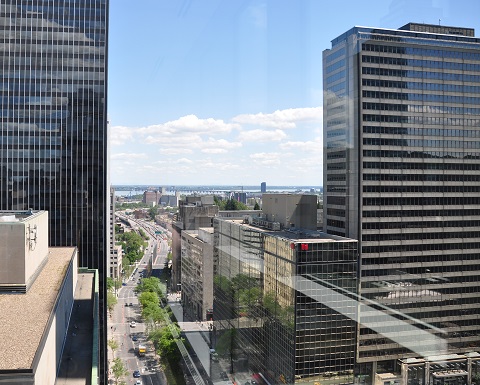
As I've posted earlier on May 25th, we have moved back to Montreal after 18 years in Europe (Paris, then Zurich, then Paris again).
It's been a busy few weeks since landing back here, with a new job and a big search for a new place to live.
I'm happy to say that we've now found a new appartment in the beautiful Altitude project in downtown Montreal. You can find a view from our office window above!
There are presently many very nice condos available in Montreal with many more projects to come, but the Altitude was the one that really caught our eye as the most interesting and attractive in town.
It's been fun being back in Montreal: not only have we been able to enjoy seeing many friends and family members a lot more than before, but also we've been able to enjoy some of the Montreal summer festivals (the Montreal Jazz Festival, the Festival Juste pour rire, and more). Of course, we have good friends that we miss in Europe, but being back here feels like home.
Now, if we can just empty those 200+ boxes that the movers have left in our appartment :-)
/misc | Posted at 09:26 | permanent link
Adobe Creative Cloud: not for me

I have been a user of various Adobe products for years. Photoshop, Premiere, Acrobat, and even some of the more obscure ones. Some of these, I use professionally at the office (notably Acrobat), but for the others, I am a casual user.
As I've never been one for pirating software, I have bought over the years the odd license for Photoshop, Premiere, and Acrobat for personal use. Most of them for Windows, but even some on MacOS X when I had switched my main computer to an iMac.
I use something like Photoshop every couple of months... Premiere, once a year or so. I still found it useful to have the "real" Adobe software because if I needed to do something, I really could do it.
Every so often, Adobe would write to me to encourage me to upgrade to the latest release... most of the time, I'd file these ads in the "Advert" folder an ignore them, but every few years or so, there would be a new feature compelling enought that I'd upgrade to keep up.
Now, they keep writing me to encourage me to subscribe to their Adobe Creative Cloud with its montly fee. Pfff! There is no way that I would saddle myself with a recurring monthly fee for something that I will not use on most months! As a general rule, I eschew recurring fees except for things which are really regular and important to me (heck, I even bought Office 2013 on my laptop instead of subscribing to Office 365).
So, I will look for alternatives to Photoshop and Premiere, and Adobe has now lost my (irregular, but somewhat recurring) revenue stream going forward.
Unfortunate move Adobe: you should have offered options to your customers.
/software | Posted at 09:13 | permanent link
Sun, 25 May 2014After more than 18 years in Europe, I am moving back to Canada and to a new job, next Friday.
It will be good to get back home and be closer to family and friends, but as always with these things, it is somewhat bittersweet because we will be leaving behind some great friends and colleagues out here.
Paris is one of the world's greatest cities, and to see the Eiffel tower every day on my way to work is something I will surely miss.
On the other hand, I am quite excited about being reunited with my sons and with the new job! I am joining a class organization and I look forward to meeting my new colleagues there and making new friends. There will be much work to do to complete the transformation of the IT of the Bank, and as IT is at the heart of Financial Services this promises to be interesting, challenging, and impactful.
There will be more to say in the coming weeks... stay tuned!
/notwork | Posted at 12:55 | permanent link